Your comments

Hi Cheryl- you can do this! When you are on an event and email players (or Text/Push), in the 2nd step there is a filter that will allow you to filter by All, Registered, Waitlisted, or Cancelled players. Default is Registered. Switch that filter to Waitlisted, hit the Filter Players button again and it will show you your players on the waitlist in the table.
We did find a bug when researching this that has since been fixed, but you can achieve this now!
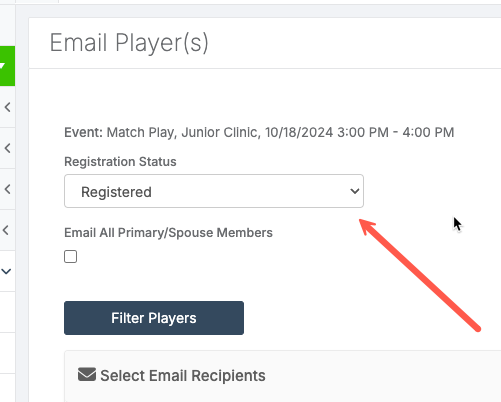
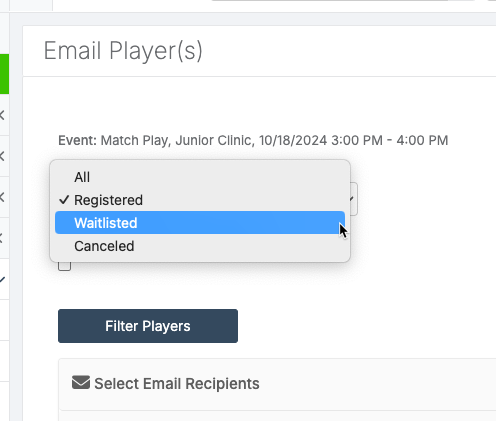
This idea was completed this past spring! Check out the April release notes for more information.
Hi James- yes, take a look at our Reservations widget. Please reach out to our live chat support for more information or email [email protected]
Yes this is actually currently in development :)
We are SO SO close on this. Just about ready to go to beta and our goal is to have this out in October.
Global announcements can now be made urgent as part of today's release.
https://courtreserve.releasenotes.io/release/oZKaF-new-features-enhancements-792024
This was added to the functionality on the mobile app and released today https://courtreserve.releasenotes.io/release/oZKaF-new-features-enhancements-792024
This was added to the Member Registration Widget and released today!
https://courtreserve.releasenotes.io/release/oZKaF-new-features-enhancements-792024
The ability to sell packages on the member portal was released today! https://courtreserve.releasenotes.io/release/oZKaF-new-features-enhancements-792024
Customer support service by UserEcho