Your comments

Edit to the above:
Change: Can we have an option to "apply pricing to ALL memberships"?
To: Can we have the option to "Apply pricing to ALL memberships EXCEPT..." - so this would be an exclusion, not an inclusion.
Agreed. Every time we have a new coach or staff member we have to look at many permissions (I believe over 50) and we may forget to give something or take something away. It would be very helpful to just update permissions at the group level.
Also, when there are enhancements, we’d have to potentially change several staff profiles.
SAME FOR STAFF NOTIFICATIONS - THERE SHOULD BE GROUP-LEVEL PERMISSIONS.
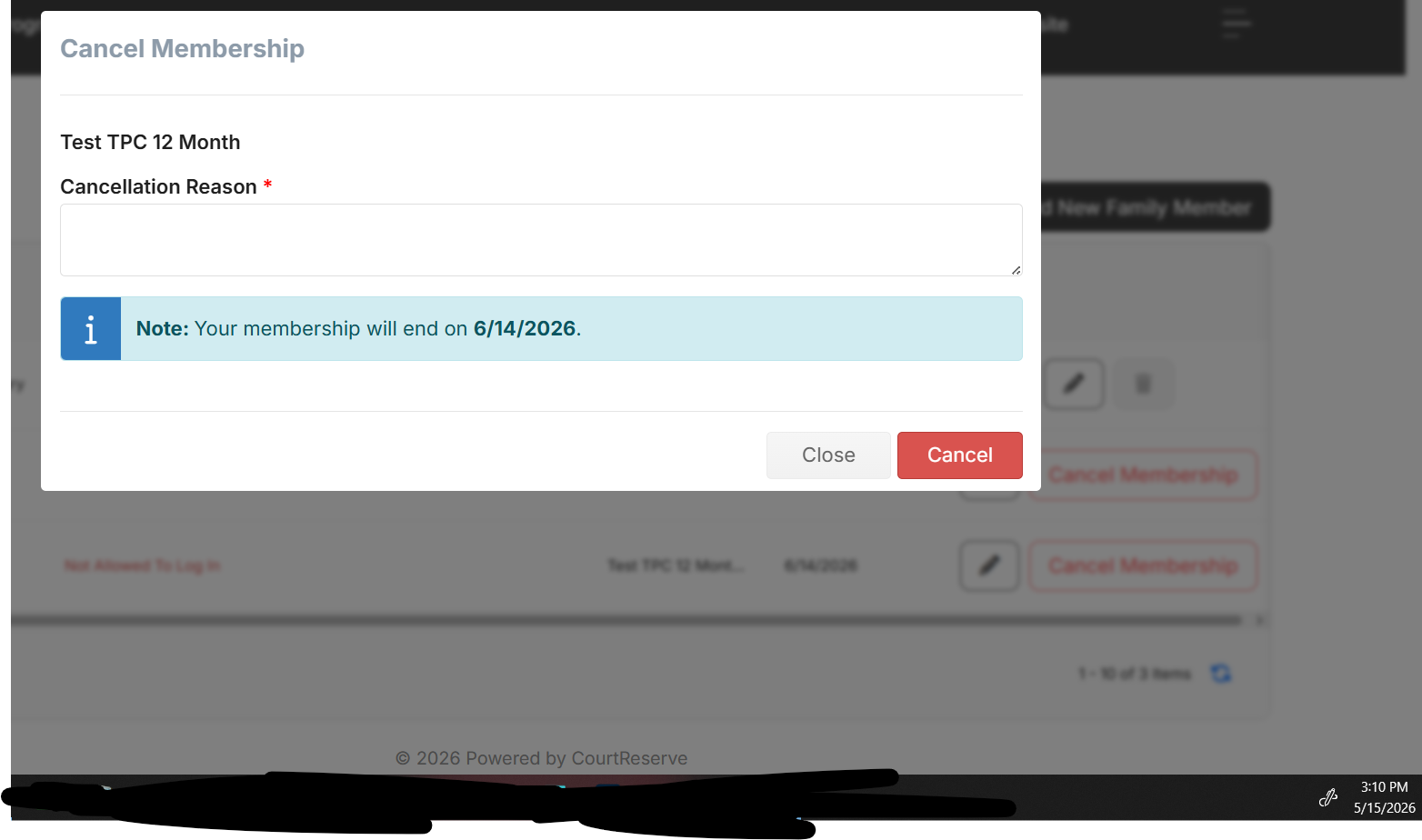
Additionally, for clients who cancel online... once they click the cancel button it still isn't clear that they canceled so they hit the button multiple times. We tested this (see below) and clicked the CANCEL MEMBERSHIP button sometime around 2:47 PM but when I go to the family profile, and received the facility email telling me that I had a cancellation. But, it doesn't tell the member that they have an active cancellation in progress. There should be a notification because when I click on it again, I get the cancel membership pop up box again.
Example:
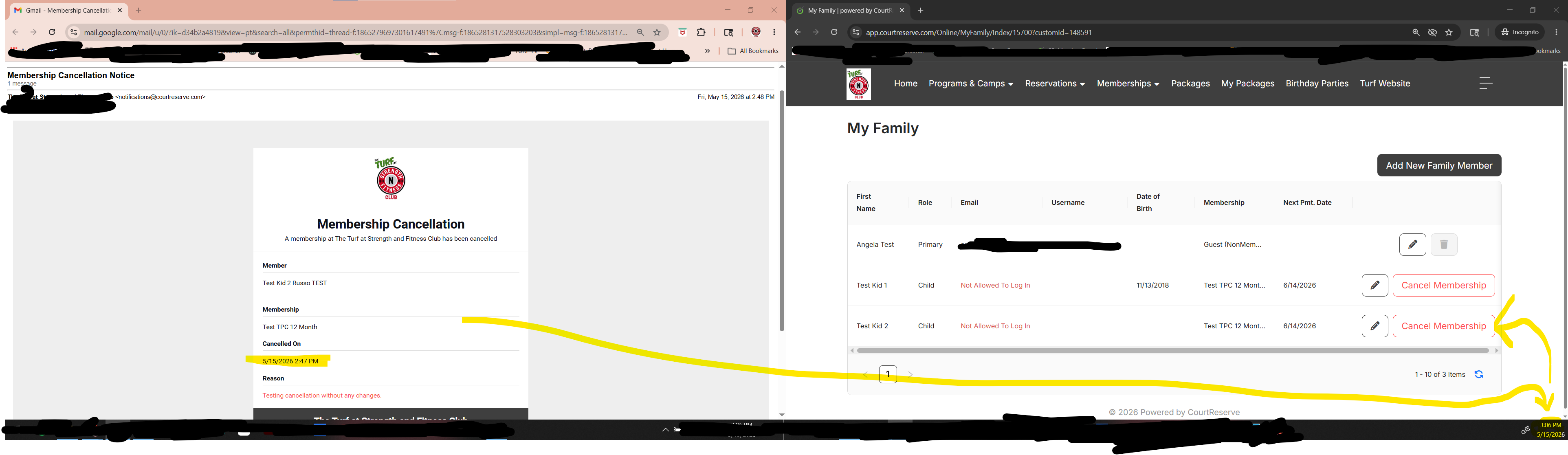
THIS HAS NOT BEEN FIXED, PLEASE REFER TO:
Also, if we turn on the feature to require payment profile... a customer (even if not a member) can never actually detach themselves from the facility (financially) because it will always ask for a backup card.
If I was a one time customer, and I was required to have a stored card, I'd want to remove it after-the-fact. Currently, they cannot actually remove themselves unless they contact the facility directly (I would think).
It seems we can do this for Reservations and Events, just not for membership purchases.
Settings > Event Settings > Event Defaults ------ Set to require payment profile
Settings > Booking Settings > Costs ------ Set to require payment profile
Agree with this one. We have had to fix quite a few of these because of adding family members (after-the-fact) or simply because a staff member missed checking off the family sharing checkbox. It was save us a lot of time if we could edit existing packages OR create a sharing relationship feature at the family level - like a setting per each profile that you can toggle package sharing for each package.
Adding to this... I have a situation where I need to reserve a block of hours AFTER-hours for a charity event for only 1 day. Currently, there is no way to do this as a reservation without creating a new court and setting hours independently - which doesn't make sense for 1 day. The only way to do this is to create an EVENT and make it non-public and click override operating hours.
Just more context as this impacts us as well:
Currently, there is no way to:
1. assign an individual membership to a specific family member in a CR family from the Client Portal
AND
2. A Family Membership cannot be purchased on the client portal only to be used for 1 specific family member within a CR family.
The only way around all this is to decouple the family and have separate logins in order to purchase separate memberships. So in cases where most of your clientele is geared towards youth training, the current design adds MUCH MORE work for administrators and goes against the idea of providing membership purchases online for such business models.
We are now looking into utilizing packages with 999999 visits per month (for example). But, another issue is that the packages screen doesn't allow for anonymous users to view it - they have to create a CR account first. It is STILL a bug that has not been fixed so the loop doesn't really provide a good customer experience.
===
There is currently no way to assign an individual membership to a specific family member within a CourtReserve family from the Client Portal. Individual memberships are assigned to a single person, and family memberships are managed under one umbrella account for multiple people .A family membership cannot be purchased via the client portal to be used for only one specific family member within a family; the family membership applies to all family members under the account, up to the maximum allowed by the plan .If a member has both an individual and a family membership, the individual membership will override the family membership's rules, restrictions, and pricing for that person. The family membership will apply to other family members who do not have an individual membership .To assign different memberships to different people, you would need to separate the family members into individual accounts and assign memberships accordingly .This setup ensures that family memberships are managed as a group, and individual memberships are managed separately.
Agree with this. But, really it should be by service as well. I don't feel comfortable making everyone store a card (even if they are here to just buy 1 drop in class and they may never be back) nor do I feel comfortable chasing money every month from our members.
Customer support service by UserEcho


We would like this too. There is no easy way to collect deposits for rentals, etc. It is an accounting nightmare.